


Why Custom Mini-ITX Builds Are Changing the Game
A custom mini ITX build packs incredible gaming performance into a compact chassis that fits on any desk. Once a niche for enthusiasts willing to compromise, the mini-ITX form factor now allows you to build a high performance gaming PC without sacrificing power. Thanks to modern hardware, these small systems can run demanding titles at high framerates, all while taking up less space than a shoebox.
Here's a quick overview:
Key Benefits:
- Space-saving design - Cases range from 4.9L to 20L (vs. 30L+ for ATX)
- Full performance - Modern mini-ITX boards support high-end CPUs and GPUs up to 415mm
- Portability - Easy to transport for LAN parties or room changes
- Clean aesthetics - Minimalist footprint without sacrificing power
Main Challenges:
- Limited expansion (typically 2 RAM slots, fewer drive bays)
- SFX/SFX-L power supplies required
- Tighter cable management
- Careful component selection needed
The appeal is simple: you get a powerful high performance desktop PC that doesn't dominate your desk. If you're tired of massive towers but still want top-tier performance, a mini-ITX build might be exactly what you're looking for. The key is understanding how to choose the right parts and manage thermals in a tight space.
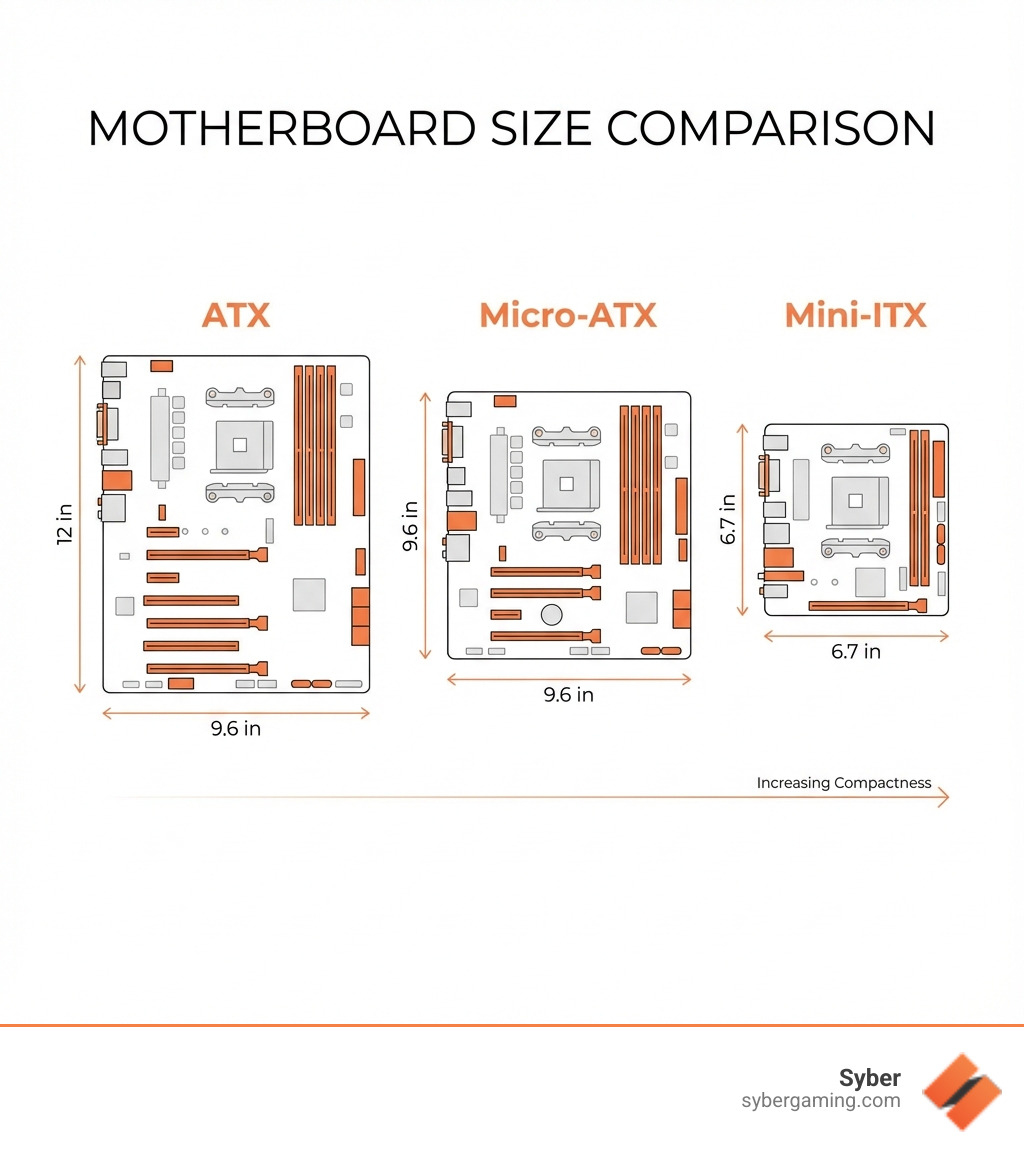
Your Blueprint for a Custom Mini-ITX Build
Starting on a custom mini ITX build is an exciting journey. It's like a puzzle, fitting powerful components into a confined space. But before you dive in, it's important to weigh the unique pros and cons of going small.
Weighing the Pros and Cons of Going Small
Advantages of a Mini-ITX Build:
- Best Portability: These compact rigs are easy to transport, making them perfect for LAN parties or moving your setup between rooms.
- Minimalist Desk Setup: A mini-ITX PC saves valuable desk space, allowing for a cleaner, more organized workspace with a modern aesthetic.
- Satisfying Build Challenge: For many enthusiasts, the intricate planning and assembly required for a small build is a rewarding experience in itself.
- Aesthetics: With sleek designs and compact footprints, mini-ITX cases offer a unique look that complements any modern gaming setup.
Disadvantages of a Mini-ITX Build:
- Limited Expansion Slots: Mini-ITX motherboards typically have only one PCIe slot, which is reserved for the graphics card.
- Fewer RAM Slots: Most boards come with two RAM slots, which can limit total memory capacity compared to larger form factors.
- Component Size Restrictions: You'll need to pay close attention to the maximum size for your GPU, CPU cooler, and power supply.
- "SFF Tax": Specialized mini-ITX components, like motherboards or SFX power supplies, can sometimes carry a slight price premium.
Understanding these trade-offs is crucial. While there are challenges, the benefits of a compact, powerful system often outweigh the limitations. For more insight into PC value, check out More info about the real value of a pre-built PC.
Selecting the Right Components for Your Compact Rig
Choosing components for a custom mini ITX build requires careful planning. Every part must fit within the tight confines of your case.
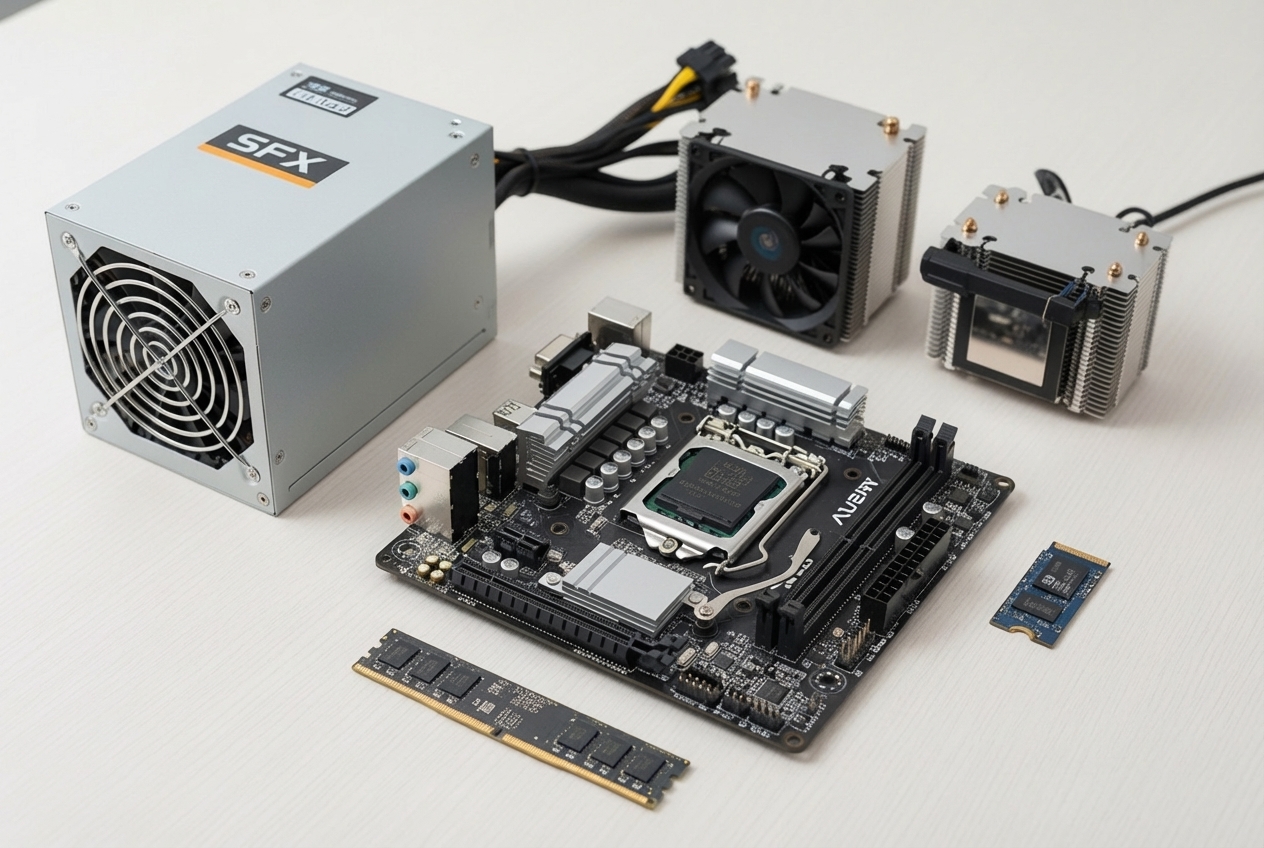
Case Selection: Your case determines everything else. Start here.
- GPU Clearance: Check the maximum supported GPU length and thickness. Many modern cases fit full-length cards.
- Cooler Height: Note the maximum CPU air cooler height, as this can be very restrictive.
- PSU Compatibility: Confirm if the case needs an SFX, SFX-L, or standard ATX power supply.
Motherboard Features: The mini-ITX motherboard is your system's hub.
- RAM Slots: Expect two RAM slots, supporting up to 64GB or even 128GB of DDR5 memory.
- M.2 Slots: Most boards have at least two M.2 slots for fast, cable-free NVMe storage.
CPU and Cooling: Balance performance with heat output.
- CPU TDP: A CPU with a lower thermal design power (TDP) is easier to cool in a small space, which is ideal for a quiet high performance desktop PC.
- CPU Cooler: You'll likely need a low-profile air cooler. Check your case's height clearance before buying.
GPU Selection: You don't have to compromise on graphics. Many mini-ITX cases now support full-size, high-performance GPUs, making it possible to create a true high performance gaming PC. Just be sure to double-check the dimensions against your case's specifications.
Power Supply (PSU):
- SFX/SFX-L: These compact power supplies are standard for mini-ITX. SFX-L units are slightly longer but may have quieter fans.
- Modular PSUs: A fully modular PSU is essential. It lets you use only the cables you need, which drastically reduces clutter and improves airflow.
Memory and Storage:
- DDR5 RAM: For modern builds, 6000MT/s CL30 DDR5 is a great sweet spot for performance and stability.
- NVMe SSDs: M.2 NVMe drives are perfect for SFF builds. They're fast, compact, and require no extra cables.
Careful component selection is the key to a successful build. For more tips, see More info on what to consider when buying a gaming PC.
Mastering Airflow: Cooling Your High-Performance Desktop PC
In a custom mini ITX build, cooling is critical. Powerful components packed into a small space generate a lot of heat, and without proper airflow, your performance will suffer.
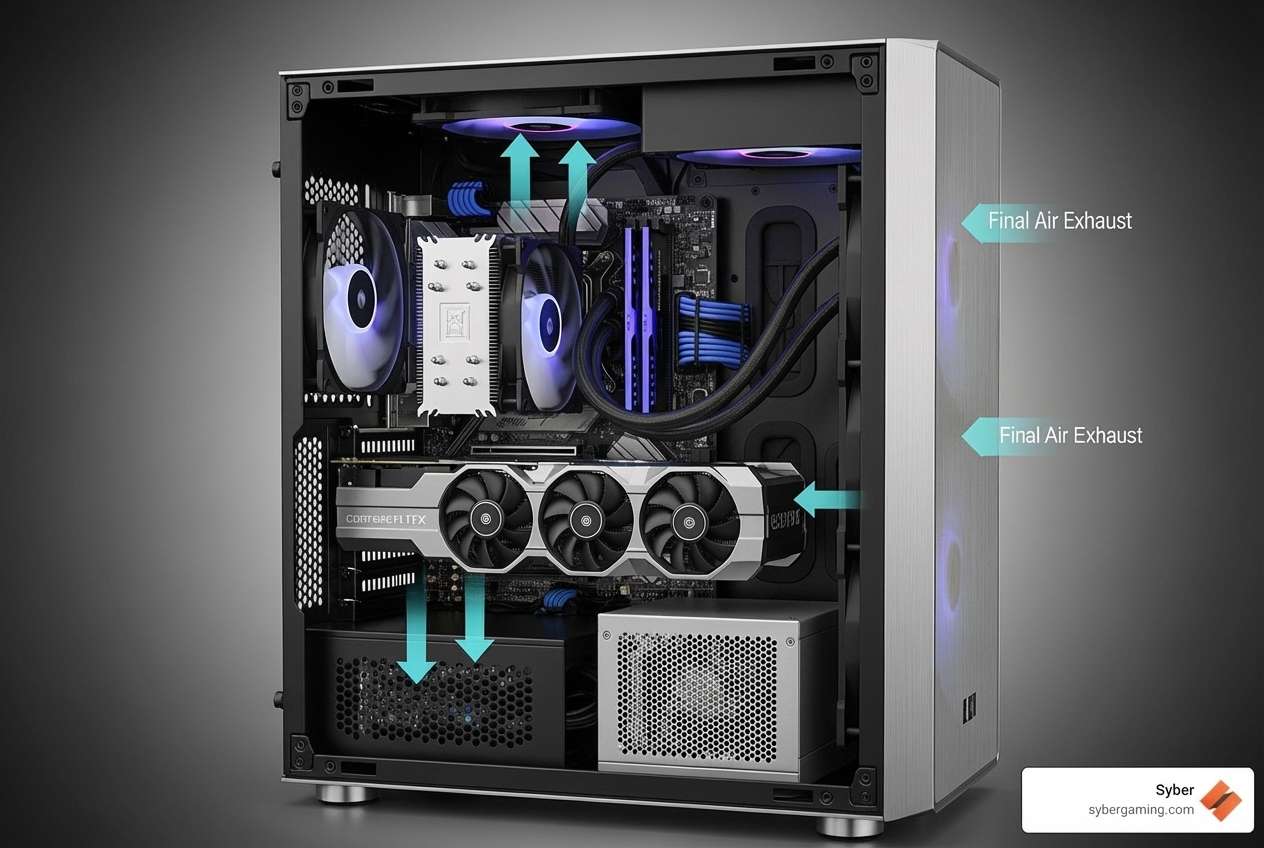
Air Cooling Solutions: Air cooling is often the most practical choice for mini-ITX.
- Low-Profile CPU Coolers: Due to height limits, a high-performance low-profile CPU cooler is often a must.
- Case Fans: Use all available fan mounts in your case to maximize airflow. A strategic setup can make a huge difference.
- Pressure Configuration: You can configure fans for positive pressure (more intake, less dust) or negative pressure (more exhaust, rapid heat removal). The best setup depends on your specific case.
AI Cooling and System Optimization: Modern systems offer smart thermal management.
- AI cooling solutions can automatically adjust fan speeds based on system load and temperatures, balancing cooling with noise levels.
- AI system optimization features can fine-tune your CPU to maintain peak performance without overheating, preventing thermal throttling.
Component-Specific Airflow: Don't just focus on the CPU. Ensure your M.2 SSDs have adequate ventilation, as they can get hot. Many mini-ITX cases also provide a dedicated air intake for the GPU, which is vital for a gaming pc high performance setup.
A well-planned cooling strategy ensures your compact PC runs cool and quiet, delivering sustained performance.
The Assembly Process: Putting It All Together
Assembling a custom mini ITX build requires more patience and planning than a standard build. The tight space makes the order of operations and cable management extremely important.
Plan Ahead: Before you start, use a tool like PCPartPicker to check for compatibility issues. Plan your cable runs to maximize airflow, as every bit of space counts. A fully modular SFX power supply is your best friend here, as it minimizes excess cabling.
Suggested Installation Order: The sequence is critical in a small case.
- Prepare the Motherboard: Install the CPU, RAM, and M.2 SSDs onto the motherboard outside the case.
- Install the Motherboard: Place the prepared motherboard into the case and connect the front panel headers (power button, USB, etc.). Accessing these later can be difficult.
- Install the Power Supply: Mount the PSU. If it's modular, connect the necessary cables to the PSU itself before securing it in the case.
- Install the CPU Cooler: Attach the CPU cooler. Apply thermal paste and secure it evenly.
- Install the Graphics Card: The GPU is usually the last major component to go in.
- Cable Management: Route all power and data cables as neatly as possible, using zip ties to keep them away from fans and airflow paths.
Power On: Once assembled, connect your peripherals and power it on. If it doesn't boot, double-check all connections.
The process is a rewarding challenge. Taking your time and planning each step is the key to success.
Performance, Pricing, and Is It Right for You?
Now that you know the intricacies of a custom mini ITX build, let's cover how they perform, what to expect for pricing, and if this small form factor is the right fit for you.
Tailoring Your Custom Mini-ITX Build for Specific Uses
Modern mini-ITX systems are incredibly versatile and can be optimized for a wide range of demanding tasks.
AI Gaming PC: A custom mini ITX build can be a powerful AI gaming PC. With support for high-end GPUs, these compact rigs deliver AI-improved visuals and high frame rates. AI gaming technology in modern components ensures you get a top-tier AI-improved gaming experience without the massive tower.
Home Theater PC (HTPC): With their small, discreet footprint, mini-ITX builds are perfect for the living room. Focus on quiet cooling and a case that blends in with your entertainment center.
Home Lab or Developer Workstation: For power users, a mini-ITX system can be a compact workhorse. With support for high RAM capacities and multiple fast NVMe drives, they are ideal for virtualization, coding, and compiling.
Here’s how to focus your component choices:
- Gaming: Prioritize a powerful GPU and an efficient CPU.
- HTPC: Focus on a low-TDP CPU, quiet cooling, and ample storage.
- Home Lab/Developer: Maximize RAM and fast NVMe storage.
Budgeting Your Build and Final Considerations
The cost of a custom mini ITX build is comparable to a mid-to-high-range ATX build with similar performance, though some specialized SFF components may have a slight price premium. The real value comes from the space-saving design, clean aesthetics, and portability.
While building your own PC is rewarding, it requires research and patience. For those who want the benefits of a compact high performance gaming PC without the hassle of assembly, a pre-built or customizable option is an excellent alternative. Syber specializes in creating optimized, hand-built expert gaming PCs in the City of Industry, CA. Our experts ensure every component is selected and assembled for peak performance and thermal management, leveraging AI-driven performance and AI cooling solutions for a superior experience.
A mini-ITX build, whether DIY or professionally assembled, offers a powerful, space-saving path to high-performance computing.
Ready to explore the possibilities of a compact, powerful gaming system?
Explore our pre-built and customizable Cube Series Mini-ITX PCs and find how Syber can deliver a high performance custom prebuilt gaming pc custom to your exact specifications.

.svg)

