


Why Your PC is the Heart of Your Stream
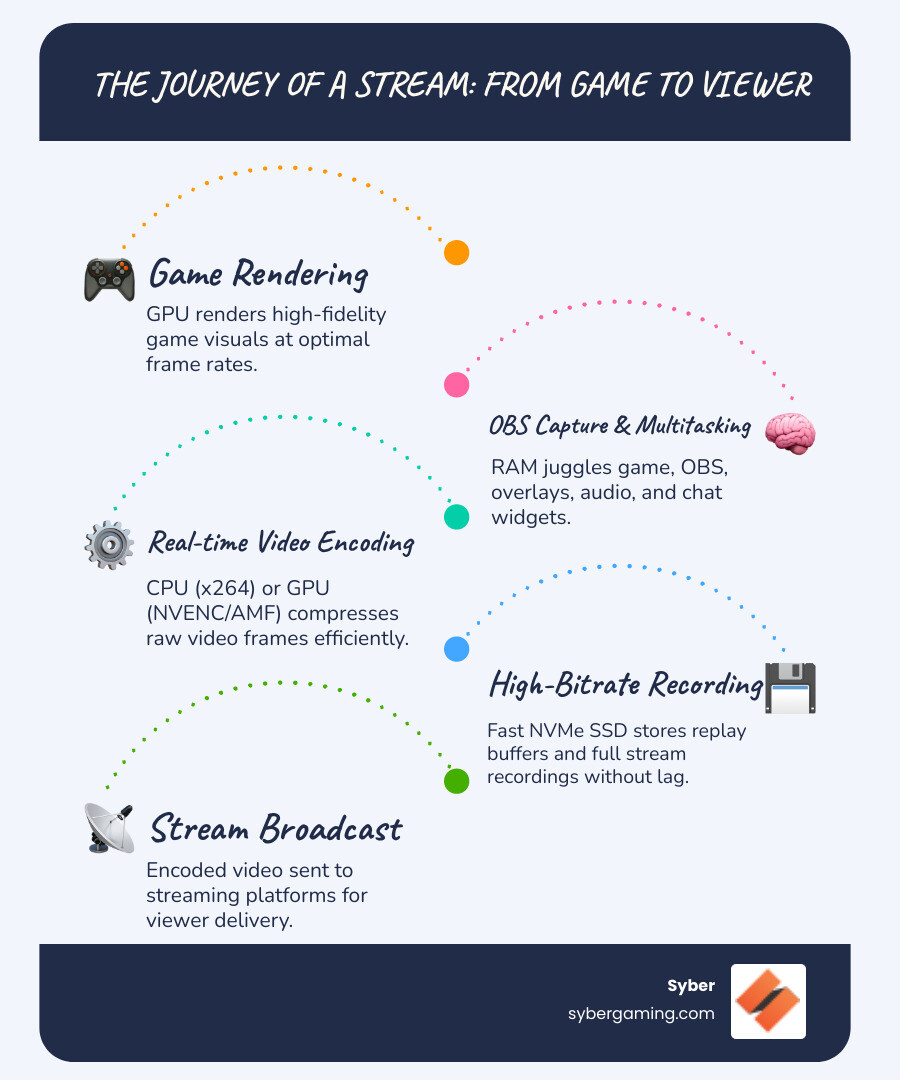
The Best PC for OBS needs to do more than just run games. Your system has to capture gameplay, encode video in real-time, manage overlays, process audio, and broadcast everything to the internet—all at once. A standard gaming PC can struggle with this intense multitasking, leading to dropped frames, encoder overload, or laggy gameplay.
Quick Answer: Essential Specs for OBS Streaming
- CPU: Multi-core processor (Intel i7/i9 or AMD Ryzen 7/9) for encoding and multitasking
- GPU: NVIDIA RTX 4060+ or AMD RX 7000 series with hardware encoding (NVENC/AMF)
- RAM: 32GB DDR5 for smooth multitasking and high-quality streams
- Storage: 1TB+ NVMe SSD (3000+ MB/s) for fast recording and replay buffer
- Internet: Stable wired connection with 6+ Mbps upload speed
When any one of these components creates a bottleneck, your viewers see stuttering, pixelation, or a disconnected stream. The good news is you don't need the most expensive parts, just the right parts working together. Modern hardware like NVIDIA's NVENC lets your GPU handle video compression with minimal performance impact, freeing your CPU for the game. Fast storage ensures recordings don't cause lag, and 32GB of RAM provides headroom for all your apps.
This guide breaks down what components matter for OBS and how to choose them for a rig that handles gaming and streaming without compromise.
Core Components for the Best PC for OBS
Building the Best PC for OBS is about balance. A powerful CPU is wasted if your GPU or storage can't keep up. When Syber creates custom build gaming pcs, the focus is on ensuring every component works in harmony, especially with the rise of AI PC components that optimize performance automatically.

CPU: The Engine for Encoding, AI System Optimization, and Multitasking
Your CPU is the central manager of your PC. While streaming, it juggles your game, OBS, Discord, browser tabs, and stream alerts. If you choose to use software (x264) encoding in OBS, the CPU takes on the very difficult job of video compression. This method can produce high-quality video but uses a lot of processing power, which can slow down your game. This is why a processor with a high core count, like an Intel Core i7/i9 or AMD Ryzen 7/9, is so important. More cores mean the CPU can handle more tasks at once—a concept known as parallel processing. One core can be dedicated to the game, while others handle the stream, audio processing, and background apps. Modern CPUs also feature AI system optimization, which helps manage these tasks to keep your game running well and your stream stable. For most streamers, a CPU with at least 8 cores and 16 threads is a great starting point for smooth AI multitasking.
For more on choosing the right processor, Syber's guide can help: What to Consider When Buying a Gaming PC.
GPU: The Powerhouse for AI-Improved Gaming and Flawless Encoding
Your GPU renders your game and, crucially for streaming, can handle video encoding. Hardware encoders like NVIDIA's NVENC and AMD's AMF are special sections of the GPU designed for video compression. Using a hardware encoder in OBS lets you stream high-quality video with very little effect on your gaming performance. NVIDIA's NVENC, found on their RTX 20-series and newer cards, is the top choice for most streamers. It provides video quality that is very close to software encoding but without the heavy CPU usage. Each new generation of RTX cards has improved NVENC. The latest RTX 40-series cards also support the new AV1 codec. AV1 offers better video quality at the same bitrate, or the same quality at a lower bitrate, which is great for viewers with slower internet. Furthermore, AI graphics rendering technologies like NVIDIA DLSS improve AI-driven performance by using AI to boost frame rates. This gives you a smoother game and a sharper image for your stream.
Learn how this technology started: Nvidia RTX 20.
RAM and Storage: The Keys to a Smooth High Performance Gaming PC Build
RAM and storage are often overlooked but are vital for a streaming PC. RAM is your system's short-term memory, holding everything you're actively using: the game itself, OBS with all its scenes and sources, browser tabs for chat, and animated overlays. While 16GB might seem like enough, it can be quickly used up, leading to stuttering in your game or stream. This is why 32GB of DDR5 RAM is the new standard for serious streamers. It provides plenty of room for all your applications to run without interfering with each other. Fast storage is just as important. An NVMe SSD is much faster than older hard drives or even SATA SSDs. This speed is critical when you're recording gameplay or using OBS's replay buffer feature. A slow drive can't write the video data fast enough, causing your game to lag or OBS to drop frames. For a well-rounded high performance gaming pc build, a 1TB or larger NVMe SSD for your operating system, games, and active projects is ideal. You can pair this with a larger, less expensive drive for storing old stream recordings.
Find more about building a balanced system here: Grow Your Buy Gaming PC.
Choosing Your Rig: Desktop vs. Laptop and Single vs. Dual PC
For a dedicated streaming setup, a high performance desktop pc is the superior choice. Desktops offer better performance, superior cooling to prevent thermal throttling, and easier upgrades. Laptops offer portability but compromise on performance and cooling, making them less ideal for demanding, simultaneous gaming and streaming.
The single vs. dual PC debate has also shifted. In the past, a two-PC setup was common for professional streaming. Today, a powerful single PC setup is more than capable for most streamers, thanks to efficient hardware encoders like NVENC. This approach is simpler, more cost-effective, and what most successful streamers use. A dual PC setup still has its place for top-tier 4K streaming or for users who capture video from a separate device and need a dedicated PC to run OBS.
Syber builds systems perfect for any setup: Streaming PCs.
Budgeting Your Build: Finding a High Performance Custom Prebuilt Gaming PC
Building the Best PC for OBS is about smart budgeting. Here’s a quick breakdown:
- Budget-Friendly: An Intel Core i5/AMD Ryzen 5, 16GB of RAM, and an NVIDIA RTX 3050/4050 will handle 1080p streaming at 30/60fps with optimized settings. An NVMe SSD is still a must.
- Mid-Range: This is the sweet spot. An Intel Core i7/AMD Ryzen 7, 32GB of RAM, and an NVIDIA RTX 4060/4070 comfortably streams demanding games at 1080p60 with high settings and complex scenes.
- High-End: For professionals streaming at 1440p or 4K. An Intel Core i9/AMD Ryzen 9, 32GB+ of fast DDR5 RAM, and an NVIDIA RTX 4070 Ti or higher provides zero-compromise performance, taking full advantage of AI gaming technology.
Syber's M Series offers a high performance custom prebuilt gaming pc for every budget, all benchmarked for reliability. Explore the options here: M Series.
Learn how Syber provides excellent value: Real Value Syber Computer.
Optimizing Your Setup: Getting the Most from the Best PC for OBS
Powerful hardware needs the right settings to perform its best. Here are a few key areas to check:
- Cooling: Your CPU and GPU generate a lot of heat, and they will automatically slow down if they get too hot. This is called thermal throttling, and it causes stuttering. A quality air-flow cooling system with good case ventilation is needed to keep temperatures down and maintain performance during long streams.
- Internet: A stable, wired Ethernet connection is a must. Wi-Fi can be unstable and lead to a buffering or disconnected stream for your viewers. You need an upload speed of at least 6 Mbps for a good quality 1080p stream.
- OBS Settings: In OBS, always choose your GPU's hardware encoder (like NVENC for NVIDIA cards). For streaming to platforms like Twitch, set your bitrate to around 6000 Kbps using CBR (Constant Bitrate) and your keyframe interval to 2. Also, check the encoder preset; a "Quality" preset often provides the best balance. Before you go live, always do a local recording test to make sure your settings work well with your game.
For more on case design and resolution, check out these guides: Case Confusion: What Does ATX Even Mean? and Resolution Rumination: What Resolution to Stream At.
Conclusion: Build Your Ultimate Streaming Machine
You now have the blueprint for the Best PC for OBS. It’s a team effort: a multi-core CPU for multitasking, a powerful GPU with a hardware encoder for smooth video, 32GB of RAM to keep everything running, and a fast NVMe SSD for lag-free recording. Modern AI gaming technology is no longer a luxury but a core part of a high performance gaming PC build, offering AI-improved visuals and AI system optimization.
Building a PC yourself can be tricky, as mismatched components create bottlenecks. A pre built gaming pc customizable to your needs eliminates that risk. Syber takes the guesswork out of the equation. Every high performance custom prebuilt gaming pc we build is rigorously tested and benchmarked to guarantee reliability and performance right out of the box. Our systems are hand-built by experts who understand the unique demands of gaming and streaming.
Learn more about our meticulous process: Hand-Built by Experts: The Syber Way.
Stop worrying about technical issues and focus on your content. With the right hardware, you can deliver smooth gameplay and a crystal-clear stream that lets your personality shine.
Ready to take your streaming to the next level? Explore our high-performance Cube Series gaming PCs and start your streaming journey today.


.svg)

