

_compressed.png)
Building More Than Just a Gaming Rig
Workstation and gaming PC builds have different design philosophies, but knowing both helps you craft the perfect machine for your needs.
Quick Answer: Key Differences Between Workstation and Gaming PC Builds
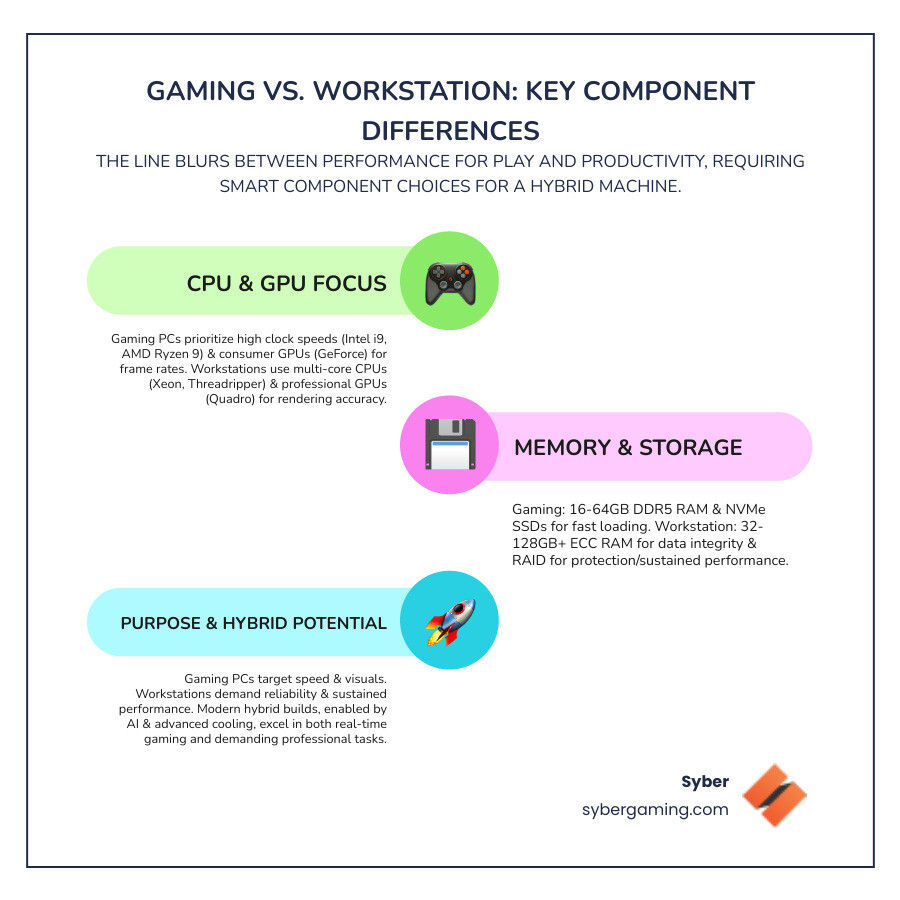
| Component | Gaming PC Focus | Workstation Focus |
|---|---|---|
| CPU | High clock speeds (Intel Core i9, AMD Ryzen 9) for single-core performance | Multi-core processors (Intel Xeon, AMD Threadripper) for parallel tasks |
| GPU | Consumer graphics (NVIDIA GeForce, AMD Radeon) for high frame rates | Professional graphics (NVIDIA Quadro, AMD Radeon Pro) for rendering accuracy |
| RAM | 16-64GB DDR5 for fast gaming performance | 32-128GB+ ECC RAM for data integrity |
| Storage | NVMe SSDs for quick load times | RAID configurations for data protection |
| Primary Use | Real-time gaming, high refresh rates | 3D rendering, video editing, scientific computing |
The line between workstation and gaming PC builds is blurring. Modern gaming hardware can handle professional tasks, while workstation components increasingly support demanding games. This convergence is driven by advancements in both hardware and software. Processors now come with a high number of cores that also run at fast speeds, and consumer graphics cards have become powerful enough for many professional-grade tasks. This is great news for users who need a single, powerful machine for diverse activities like content creation, streaming, and gaming.
This shift is important if you're building a high-performance gaming PC that pulls double duty for streaming, video editing, or design work. Understanding both worlds helps you make smarter choices about processors, graphics cards, and cooling.
Traditionally, workstations prioritize reliability for heavy loads, while gaming PCs chase raw speed. Now, AI-driven performance optimization and advanced cooling let you build a system that excels at both.
This guide will help you choose the right components, balance gaming with professional capabilities, and save money without sacrificing quality.
Core Components: The Heart of Your Workstation and Gaming PC
Building a high performance gaming PC, whether a custom build gaming pcs project or a PC pre built for gaming, starts with the core components. These parts define everything from frame rates to rendering times. Thankfully, modern AI PC components blur the lines between a gaming powerhouse and a workhorse, letting you build one machine for both.
The Processor (CPU): Juggling Cores and Clock Speeds
For a workstation and gaming PC, your CPU choice comes down to speed versus computational force. Gaming thrives on high clock speeds for smooth frame rates, as most games rely on a few powerful cores. Processors like the Intel Core i9 or AMD Ryzen 9 series excel here, prioritizing single-core efficiency to deliver top gaming speeds.
Professional work like video editing or 3D modeling, however, benefits from multi-threaded applications that use many cores at once. For hybrid builds, modern high-end consumer CPUs offer the best of both worlds: high core counts and impressive clock speeds. With AI-driven performance optimization, your high performance desktop PC can intelligently allocate resources for either gaming or work, letting you switch tasks seamlessly. A CPU's cache, a small amount of very fast memory, also plays a role. A larger cache can store more frequently used data, reducing the time the CPU has to wait for information from the RAM, which benefits both gaming and productivity.

The Graphics Card (GPU): Visuals for Victory and Vocation
The GPU is your PC's artistic soul. For gaming, you need real-time processing and high frame rates. Consumer GPUs like NVIDIA GeForce and AMD Radeon are built for this, pushing pixels fast for smooth motion and supporting ray tracing for realistic lighting. The latest cards also feature AI-powered graphics; technologies like DLSS boost frame rates without losing image quality. Syber builds systems that leverage these technologies, from NVIDIA RTX 20 cards to the newest generation.
Professional work, by contrast, demands rendering accuracy and precision. Workstation GPUs use professional drivers optimized for stability in specific software. These professional drivers undergo rigorous testing and certification for applications like CAD and 3D modeling software. This ensures that the hardware behaves predictably and avoids visual glitches or crashes during critical work. Gaming drivers, in contrast, are updated frequently to optimize performance for the latest game releases. For a hybrid high performance gaming PC build, a high-end consumer GPU is often the best compromise. It offers enough power for creative tasks like video editing and 3D rendering alongside exceptional gaming performance. AI features in modern cards also accelerate some professional applications, making them very versatile.

RAM and Storage: Key Choices for a Workstation and Gaming PC
Memory and storage are crucial for a fast, reliable workstation and gaming PC. Gamers need fast load times, which NVMe SSDs deliver by loading games and operating systems in seconds. For RAM, 16GB to 32GB of DDR5 RAM is ideal for smooth gameplay and multitasking. Syber focuses on this balance in its Real Value: Syber Computer configurations.
Professional workloads need more capacity and data integrity. Projects may require 32GB to 128GB+ of RAM, and workstations often use ECC RAM to prevent data corruption. RAID configurations for storage offer data redundancy. For example, a RAID 1 setup uses two drives to mirror data, so if one drive fails, your information is still safe on the other. While this level of protection is usually reserved for dedicated workstations, it highlights the different priorities. For a hybrid build, regular backups to an external drive or cloud service are a practical alternative. For a hybrid high performance custom prebuilt gaming PC, use a fast NVMe SSD for your OS and games, with a larger secondary drive for other files. 32GB of DDR5 RAM is a great sweet spot for both demanding games and content creation. While consumer platforms lack ECC RAM, quality DDR5 is stable enough for hybrid use.
Chassis and Cooling: The Foundation of a High-Performance Build
Your PC case and cooling system are vital for performance and component longevity. While gaming cases often feature aesthetics like RGB lighting, the best ones prioritize airflow. Good cooling prevents thermal throttling (where components slow down from heat), ensuring stable temperatures and consistent frame rates. A well-designed case will feature a mesh front panel for unrestricted air intake, multiple fan mounts for a clear airflow path (cool air in, hot air out), and dust filters to keep internal components clean. This focus on air cooling is crucial for preventing parts from overheating and reducing their lifespan. Many gaming pc high performance builds have configurable cooling to balance performance and noise.
Workstations require serious cooling for long, demanding tasks, focusing on consistent airflow and build quality. For a hybrid build high performance gaming pc, choose a chassis with both. Syber's M-Series, with its focus on superior air-flow cooling, is a great example. Advanced air-cooling, with multiple fans and a quality CPU cooler, is effective for both gaming and rendering. Some systems even use AI cooling solutions to adjust fan speeds dynamically. A good chassis also ensures upgradability and dependability, allowing your pre built gaming pc customizable system to evolve.
The Hybrid Build: Assembly, Performance, and Final Touches
Building a hybrid workstation and gaming PC requires careful planning to balance high-frame-rate gaming with intensive rendering. Syber's expertise in custom build gaming pcs helps create a pre built gaming pc customizable to your unique workflow.
The Hybrid Advantage: Optimizing a Workstation and Gaming PC
A hybrid high performance desktop pc offers incredible versatility. A powerful gaming PC can handle professional tasks like video editing, 3D rendering, and even CAD for smaller projects. The main benefit is having one machine for work and play, saving space and money. Modern hardware with AI multitasking makes this even more viable, as the system intelligently manages resources for gaming or rendering. This AI gaming experience helps bridge the gap between the two worlds. For more tips, see What to Consider When Buying a Gaming PC.
However, there are limitations. Dedicated workstations have features like ECC RAM and professional GPUs with certified drivers for maximum stability and precision, which a gaming PC might not match for mission-critical work. Likewise, a workstation's GPU may not offer the same gaming performance as a consumer card. For example, a professional GPU might offer superior 10-bit color depth for graphic design, a feature less common on gaming cards. Similarly, the specialized drivers for workstation cards provide certified stability that a gaming card's drivers, optimized for speed, may not guarantee in professional software.
The key to optimizing a hybrid workstation and gaming pc is to prioritize your main use. For gaming-focused users, a high-end gaming CPU and GPU are best. For professionals who game, a multi-core CPU with a high-end consumer GPU is a good balance. A well-designed hybrid is versatile and cost-effective, and with AI-driven performance, the efficiency differences between workstations and hybrids are narrowing.
Final Considerations: Cost, Warranty, and Your Perfect Build
Choosing your build involves balancing performance, features, and cost. In a cost comparison, workstations are pricier due to specialized, certified hardware, but the investment buys dependability for professional work. Gaming PCs are more cost-effective for entertainment and are easier to upgrade over time.
When you purchase build specific gaming PCs from a builder like Syber, you're investing in quality. Syber provides excellent warranty services and rigorous testing for maximum performance and dependability. This customer support protects your investment.
For your perfect build, be honest about your primary use. If it's professional work, lean towards workstation parts. If it's gaming, prioritize high clock speed CPUs and consumer GPUs. For a hybrid high performance custom prebuilt gaming pc, balance is key: a strong CPU, a high-end consumer GPU, 32GB+ of fast DDR5 RAM, and NVMe SSDs. A robust hybrid from a trusted builder like Syber ensures dependability for both work and play, backed by a strong warranty. Ultimately, the perfect build is a reflection of your needs. By carefully considering your primary tasks—whether they are gaming, content creation, or a mix of both—you can create a powerful and reliable system. A hybrid PC built with quality components offers a fantastic balance of performance for work and play, making it a smart investment for the modern power user.
Ready to explore high-performance options that can cater to both your gaming and professional needs?


.svg)

