

Why You Need a Website to Help Build Gaming PC Before Buying Parts

Starting a high performance gaming pc build is exciting, but it can get stressful fast if you realize your parts don’t work together. A website to help build gaming pc projects is the easiest way to avoid expensive mistakes, check fitment, and compare prices across retailers before you buy.
Top PC building websites to start with:
- PCPartPicker: Automatic compatibility checks, price comparisons, and community build galleries.
- Logical Increments: Tiered recommendations (budget to beast), updated as new parts drop.
- Community forums/Reddit build logs: Real-world results, troubleshooting, and photos.
These platforms help you plan a gaming pc high performance setup without guesswork. The best ones combine compatibility engines (so you don’t mismatch sockets, RAM, or case size) with price tools that hunt deals across many vendors. PCPartPicker is a favorite because it filters parts as you choose them and flags issues early, which makes it easier to build high performance gaming pc systems on a real-world budget.
Logical Increments is great when you don’t want to start from a blank page. You pick a tier and get a clean parts list with a simple upgrade path. That’s helpful whether you’re designing a DIY rig or comparing your list to a pre built gaming pc customizable option.
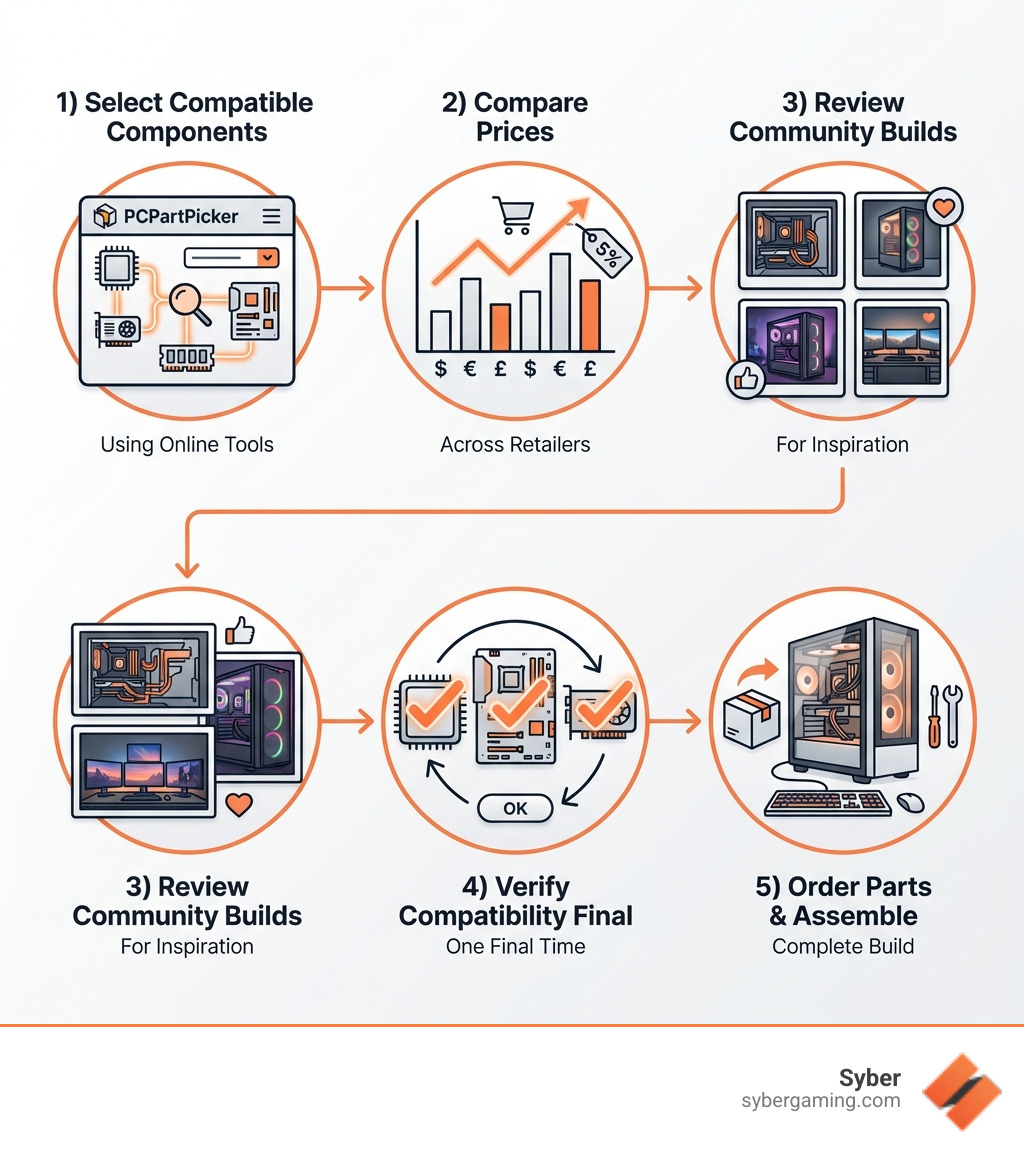
Simple website to help build gaming pc word guide:
CTA: Want a shortcut that still gets you a dialed-in parts list? Start your plan with PCPartPicker or Logical Increments, then compare it to Syber’s air-flow-cooled systems at https://sybergaming.com/.
The Best Website to Help Build Gaming PC Projects
When you start a high performance gaming pc build, the sheer number of components can feel overwhelming. This is where a dedicated website to help build gaming pc becomes an invaluable tool. These platforms simplify the process of selecting, pricing, and ensuring compatibility for your dream machine.
PCPartPicker stands out as a premier destination for DIY builders. It offers a suite of tools that address common pain points. You can start by selecting a CPU, and the system immediately filters for compatible motherboards and RAM. This intelligent filtering prevents you from picking parts that won't work together, saving you time and frustration.
Beyond compatibility, these sites act as price aggregators. They scan online retailers to find the best current prices for every part of your build. You can save significant money by comparing vendors without visiting each site individually. The platform even tracks price histories, helping you decide if it's the right time to buy.
For those who want a more curated experience, Logical Increments offers a tiered system. You can choose a performance level, like "Entry" or "Monstrous," and get a list of recommended components optimized to work together. These lists are updated for the latest hardware, including the AMD R9 9950X3D and new GPUs like the Nvidia RTX 5070.
Mastering Compatibility with a Website to Help Build Gaming PC
The biggest hurdle for DIY builders is ensuring parts work together. A website to help build gaming pc checks various parameters to flag issues early. For example, it checks socket types to ensure your CPU and motherboard match. It also checks RAM clearance, as large air-flow coolers can sometimes block memory slots.
Power Supply Unit (PSU) wattage is another vital check. A high performance gaming pc build needs enough power to run stably. The website estimates your total power consumption and recommends a PSU. It also checks if your video card will fit inside your chosen case. Since Syber focuses on superior air-flow cooling, understanding these clearances is crucial for thermal management. As AI PC components become more common, these tools will help you select parts optimized for AI-powered gaming and AI graphics rendering.
For a professionally built system with guaranteed compatibility, explore the Syber M-Series: More info about Syber M-Series
Finding Inspiration Through Community Build Guides
A great website to help build gaming pc also offers a community section for inspiration. PCPartPicker’s "Completed Builds" section showcases thousands of user systems with photos and performance feedback. Seeing how others handled their "2025 build" can give you ideas for your own custom build gaming pcs.
These galleries allow you to see how components look together and how builders managed their cables. You can also find AI-ready gaming PC builds that demonstrate how to integrate hardware for AI-driven performance. If you are looking for a unique design, the Syber Cube Series offers inspiration for compact, powerful machines: More info about Syber Cube Series
Tiered Recommendations for Every Budget
Logical Increments helps those who don't want to start from scratch. By categorizing builds into tiers from "Entry" to "Monstrous," they ensure every part works harmoniously for gaming pc high performance. These recommendations are updated as new hardware like the RTX 5070 Ti or RX 9070 XT is released, helping you build high performance gaming pc systems that stay current.
Beyond the Tools: Finalizing Your High Performance Custom Build
A website to help build gaming pc projects gives you the blueprint, but getting a truly smooth, stable rig takes a little more. Whether you’re finishing a DIY system or picking from pre built gaming computers, the goal is the same: strong performance, good thermals with air-flow cooling, and settings that make your games feel great.
AI Gaming PC Performance: Picking AI PC Components Without the Guesswork
A big trend right now is the AI gaming PC. That doesn’t just mean “new parts.” It’s about choosing AI PC components that can handle modern features like upscaling, creator tools, and background tasks while you play.
A good build site helps you prioritize hardware for:
- AI-powered gaming features (like GPU-accelerated effects and smarter upscaling)
- AI-enhanced gaming visuals and smoother frame pacing
- AI graphics rendering for streaming overlays, editing clips, and creative work
- AI multitasking (Discord, browser tabs, recording, and game launchers running together)
You’ll also see more talk about AI-driven performance and AI system optimization. In plain terms: the right CPU/GPU combo and drivers can help games run more consistently, especially at higher settings.
One more thing builders forget: AI PC security. If you’re a professional who games after work, you probably have accounts, payment methods, and work logins on the same machine. Stick to well-known motherboards, keep firmware up to date, and use trusted security tools. A stable system is part performance and part safety.
DIY vs. High Performance Custom Prebuilt Gaming PC: What Actually Changes?
Building your own rig is fun and you learn a lot. But if you want guaranteed results with less hassle, a high performance custom prebuilt gaming pc can make more sense. The key difference isn’t “prebuilt vs DIY pride,” it’s testing and support.
With a quality gaming pc pre built, you’re paying for:
- Proper parts matching and validated compatibility
- Stress testing and benchmarks to confirm stability
- Clean setup and tuned air-flow cooling (no liquid-cooling mentions needed)
- Warranty and support if something goes sideways
This is also where “custom” matters. A pc pre built for gaming should still let you choose the parts that affect your real experience: CPU, GPU, RAM capacity, storage, and case style. In other words, you want a pre built gaming pc customizable enough to match your games and your monitor.
If you’re shopping custom build gaming pcs vs. prebuilts, compare these items side-by-side:
- GPU tier for your resolution (1080p / 1440p / 4K)
- CPU that won’t bottleneck competitive titles
- RAM capacity and speed for today’s games
- SSD size so you’re not uninstalling every week
- Case clearance and air-flow cooling design
Done right, either route gets you a high performance desktop pc that feels fast every day, not just in a benchmark.
For a professionally assembled system with air-flow cooling and a warranty, check Syber’s lineup: https://sybergaming.com/
AI-Driven Gaming Rig Goals: What “Advanced AI Gaming” Really Means
Marketing terms can get noisy, so here’s a clean way to think about an AI-driven gaming rig:
- You get strong AI gaming performance in games that use modern upscaling and effects.
- You’re ready for AI gaming technology that keeps showing up in drivers and game engines.
- You can push AI-enhanced visuals while still keeping frame rates where you want them.
- Your system stays stable during long sessions because cooling and power are sized correctly.
That’s the real “future-proofing” for an AI-ready gaming PC: balanced parts, proven stability, and enough headroom for what you actually do.
CTA: Ready to skip the trial-and-error and still get the specs you want? Build your parts list, then compare it to Syber’s air-flow-cooled, customizable gaming PCs at https://sybergaming.com/.


.svg)

